I had this problem with my graphics card: It stopped working. So after playing with stuff I didn't really understand I ended up disabling my on-board graphics chip, resulting in some long beeps at startup and having no display to fix the problem with.
So I had to reset the BIOS or CMOS or whatever, so I could work again. Google said I should find a jumper (those tiny rectangles that you put on those pointy pins) on the motherboard and moving it will reset the CMOS. I didn't find it anywhere, so I did the next best thing: Removed the motherboard battery (or CMOS battery if you really want to call it that).
I used the power supply switch to turn it off, then found the 3v batt underneath the graphics card and removed it. This guide said I should wait at least five minutes. I think one minute is enough but I waited 5 anyway. After which I put the batt in again and it worked--My stupid change reverted along with any other changes I made over the years.
[ My motherboard is GA-MA78GM-US2H (Gigabyte) ]
Saturday, July 17, 2010

Wednesday, July 7, 2010
Disable Hibernate - Windows 7
I'm tired of the hibernation file taking up space and being all fragmented and annoying. So if you never use it, here's how you disable hibernation on Windows 7 forever and delete the huge file that comes with it:
Source: http://blogs.techrepublic.com.com/itdojo/?p=1493
- Open a command prompt as an administrator.
- Type "powercfg.exe -h off" (without the quotation marks)
Source: http://blogs.techrepublic.com.com/itdojo/?p=1493
Saturday, September 26, 2009
Weave Web UI - Passwords Ideas
"The Mozilla Labs Design Challenge is a series of eventsto encourage innovation and experimentation in user interface design for the Web." (link)
Like I've said before Weave is a great Firefox extension that syncs your browser data (that includes, bookmarks, history, cookies, passwords, form auto-completions, tabs, preferences, extensions and more in the future) across all your browsers: On your desktop PC, laptop or mobile.
So anyway, Mozilla set a project for letting the users help out on suggesting ideas for the Weave Web UI. Here's mine.
I'm not that good with UI but I know what I want; The problem with the auto-completion of passwords is that you forget them rather quickly when you don't need to type them anymore! So providing a "forgetful" mode for a login sounds good. If you could mark a password for a reminder every now and then you probably won't have to dig through your mail looking for that activation mail from your website or to reset a password when you're using another computer without Weave installed.


Now for the web UI. I don't know if this will / should be the final design, simply because I don't know what will be comfortable. But still, here's what I had in mind for the Weave Passwords Web UI:


To create these I used Balsamiq Mockups: http://www.balsamiq.com/demos/mockups/Mockups.html
Sunday, September 20, 2009
Transparent Firefox Theme (Windows Aero style)
If you've seen the Firefox 4 mockup theme and thought it was cool, or if you want Firefox to look cool with Windows Aero's cool transparency effect, check out this cool addon. Try it, it's cool.
With the tabs below the menus:

With the tabs above the menus:

With the tabs below the menus:

With the tabs above the menus:

Tuesday, September 15, 2009
Black Screen at Windows 7 Login
I'm using Windows 7 and set Windows updates to install automatically.
However, one specific update was, after restart, causing Windows to show a bank screen after login. I start up the computer, wait a bit, watch the login sequence and after the "Welcome" fades out to black I get nothing but my mouse pointer.
Using Safe Mode I removed the most recent Windows Update item and my computer got back to normal. The night after it tried to install itself again, so the exact same thing happened. Now it's hidden so it won't cause problems anymore.
The update is called "Security Update for Microsoft Visual C++ 2008 Redistributable Package (KB973924)". I don't mind not installing that.
Monday, August 24, 2009
Remove Catalyst Menu Item from Windows' Context Menus

I'm used to click the View menu by right-clicking anywhere and clicking straight away to open it. Since ATI's Catalyst Control Center added itself to that menu, it had to go.
This is how you remove that annoying menu item:
- Open the Registry Editor.
- Go to HKEY_CLASSES_ROOT\Directory\Background\shellex\ContextMenuHandlers.
- Backup (export) that key in case you mess things up.
- Remove ACE from that registry item.
Saturday, August 22, 2009
Warning! Your're in danger!
I woke up this morning at 8.10 because I wanted to wash the cars before it got too hot outside. I went downstairs and I find my parents in the living room watching TV. When they saw me they said with a huge smile on their face "Ah, finally you're awake! We need your help!"
So they pulled me to the family computer and what I saw was this: (found the screenshot on the web)
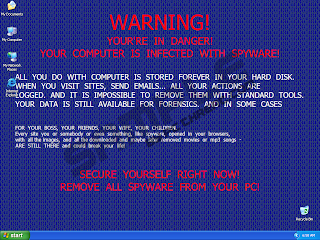
That computer had a fully purchased (and legit) version of the latest ESET installed with its Firewall, Antivirus and Antispyware features enabled. This malware is oldish, and I really didnt understand how that computer got infected. So I asked my dad just that, to which he replied "My ESET wasn't working so I saw this free online scanner but it didn't help."
I googled for a minute or so until I found an article saying something about that malware and about it being sometimes installed through what seems to be an online scanner. Hmm. Why does that sound familiar...?
I found the solution several seconds after that, but I wanted to see if the tools I have installed on my computer would find it. I have Avast, Ad-Aware and Spybot all running in the background. I couldn't install Avast on the family comp so I could only test the other two. Sadly, they both failed. Spybot found one registry value but that's it.
Several bloggers recommended SpyDoctor, and others said Malwarebytes' Anti-Malware application will solve it. I downloaded the latter seeing how SpyDoctor is not free.
So anyway, the removal process is fairly easy:
So they pulled me to the family computer and what I saw was this: (found the screenshot on the web)

WARNING!Aside from replacing your wallpaper with that horribly written message, this malware disguised itself as Total Security 2009 and kept giving annoying prompts to install their software for an exaggerated fee. It immediately closed any EXE I tried to launch and only allowed IE to run, but didn't let me surf anywhere.
YOUR'RE IN DANGER!
YOUR COMPUTER IS INFECTED WITH SPYWARE!
ALL YOU DO WITH COMPUTER IS STORED FOREVER IN YOUR HARD DISK.
WHEN YOU VISIT SITES, SEND E-MAILS... ALL YOUR ACTIONS ARE
LOGGED. AND IT IS IMPOSSIBLE TO REMOVE THEM WITH STANDART TOOLS.
YOUR DATA IS STILL AVAILABLE FOR FORENSICS. AND IN SOME CASES
FOR YOUR BOSS, YOUR FRIENDS, YOUR WIFE, YOUR CHILDREN.
Every sit you or somebody or even something, like spyware, opened in your browsers,
with all images, and all downloaded and maybe later removed movies or mp3 songs -
ARE STILL THERE and could break your life!
SECURE YOURSELF RIGHT NOW!
REMOVE ALL SPYWARE FROM YOUR PC!
That computer had a fully purchased (and legit) version of the latest ESET installed with its Firewall, Antivirus and Antispyware features enabled. This malware is oldish, and I really didnt understand how that computer got infected. So I asked my dad just that, to which he replied "My ESET wasn't working so I saw this free online scanner but it didn't help."
I googled for a minute or so until I found an article saying something about that malware and about it being sometimes installed through what seems to be an online scanner. Hmm. Why does that sound familiar...?
I found the solution several seconds after that, but I wanted to see if the tools I have installed on my computer would find it. I have Avast, Ad-Aware and Spybot all running in the background. I couldn't install Avast on the family comp so I could only test the other two. Sadly, they both failed. Spybot found one registry value but that's it.
Several bloggers recommended SpyDoctor, and others said Malwarebytes' Anti-Malware application will solve it. I downloaded the latter seeing how SpyDoctor is not free.
So anyway, the removal process is fairly easy:
- If you're already logged in and the wallpaper is there, it means you can't access any applications or the internet so obviously you can't remove the malware right now.
- That's why you need to log out and log in again, but this time you must quickly open the Task Manager (ctrl+shift+esc) and kill the malware process using the Processes tab.
The process name should be a very large number followed by the extension ".exe". e.g. 9999999.exe or something, the number may vary. - Now that you have regained control over your computer, download Malwarebytes' Anti-Malware application from their homepage and perform a full scan. It might take a while, but eventually it will find and remove all items related to this malware.
- If you don't wanna install anything or wait for it to finish, you'll need to do the following. If they're write-protected, try to start the computer with safe-mode.
But I strongly recommend shutting down the process yourself and installing Anti-Malware.- From the TaskManager, kill the 9999999.exe and the install.exe processes.
- Remove these registry values:
Delete registry values:
HKEY_LOCAL_MACHINE\software\microsoft\windows\currentversion\uninstall\systemsecurity2009
HKEY_LOCAL_MACHINE\software\microsoft\windows\currentversion\uninstall\systemsecurity2009 displayicon
HKEY_LOCAL_MACHINE\software\microsoft\windows\currentversion\uninstall\systemsecurity2009 displayname
HKEY_LOCAL_MACHINE\software\microsoft\windows\currentversion\uninstall\systemsecurity2009 shortcutpath
HKEY_LOCAL_MACHINE\software\microsoft\windows\currentversion\uninstall\systemsecurity2009 uninstallstring - Delete the 9999999 directory and all of its files from c:\documents and settings\all users\application data\. (The process might be using these)
- Delete the shortcuts from your desktop and start menu.
Friday, August 21, 2009
HRESULT E_FAIL PowerPoint Solution
I was looking into developing some Office utilities using their DLLs, and for starters--creating a tool for generating PowerPoint presentations from an image directory using C#.
But when I ran this code:
So thanks to this post I found out that you must install the Visual Basic for Applications from the Microsoft Office CD in order to actually use the DLLs Microsoft supplies:

This solution also applies for developing with other Office products such as Word, Outlook and others.
But when I ran this code:
ApplicationClass powerpoint = new ApplicationClass();I got this exception:
Presentation ppt = powerpoint.Presentations.Add(MsoTriState.msoFalse);
Error HRESULT E_FAIL has been returned from a call to a COM componentI've been looking for an answer for a while (for at least 10 minutes!) when it was finally time to ask it in a forum.
So thanks to this post I found out that you must install the Visual Basic for Applications from the Microsoft Office CD in order to actually use the DLLs Microsoft supplies:

This solution also applies for developing with other Office products such as Word, Outlook and others.
Friday, July 31, 2009
How to open PPS / PPSX file
As you probably know, PPS / PPSX and PPT / PPTX are really the same, but the way PowerPoint handles them is different. PPS / PPSX will be played full-screen on double-click, while PPT / PPTX will open for edit.
On Office 2003 and earlier, to "convert" PPS files to PPT, you just need to change the extension. But on Office 2007 it takes more mouse clicks, but it's still really easy.
Follow these steps to change ppsx to pptx:
On Office 2003 and earlier, to "convert" PPS files to PPT, you just need to change the extension. But on Office 2007 it takes more mouse clicks, but it's still really easy.
Follow these steps to change ppsx to pptx:
- Open PowerPoint 2007.
- Close the new empty slideshow but leave PowerPoint open.
- Drag or open (File > Open...) the PPSX file in PowerPoint.
- Save the file as PPTX.
Friday, July 3, 2009
Cursor won't move on scummVM (S60 3rd)
I recently found out about ScummVM: (from the site)
What you need to do in order to start controlling ScummVM with your keypad is to type the following keys in this order:
...a program which allows you to run certain classic graphical point-and-click adventure games, provided you already have their data files. The clever part about this: ScummVM just replaces the executables shipped with the games, allowing you to play them on systems for which they were never designed!So I downloaded it and installed on my Nokia 6120c and after some desperate attempts I gave up trying to move its the cursor. So I googled for a solution.
What you need to do in order to start controlling ScummVM with your keypad is to type the following keys in this order:
- Send
- j
- 1
- Send
Fix Hebrew Encoding
I found this site with an excellent Hebrew encoding tool, just type the weird gibberish string and you'll automatically get the original string!
http://www.pixiesoft.com/flip/
http://www.pixiesoft.com/flip/
Sunday, June 28, 2009

Tuesday, June 23, 2009
Tim Burton's Alice in Wonderland Pictures
Check out this image gallery from Tim Burton's 2010 film "Alice in Wonderland" (Click for larger view).





Wednesday, June 17, 2009
Get Rid of the Office Live Workspaces Pop Up
If you use Microsoft Update you probably get these annoying popup every time you open Word / PowerPoint / other Office 2007 applications.

The Office Live Workspaces feature comes with some feature installed by Microsoft Update. I tried logging but the popup is still there every time I open an Office 2007 application.
So here's what to do if you don't want this popup:
(source: Link)

The Office Live Workspaces feature comes with some feature installed by Microsoft Update. I tried logging but the popup is still there every time I open an Office 2007 application.
So here's what to do if you don't want this popup:
- Open the Windows Registry Editor
- Go to HKEY_CURRENT_USER \ Software \ Microsoft
- Create a new key named "OfficeLive"
- Close the Registry Editor
(source: Link)
Friday, June 5, 2009
Bugs Bunny Ball and Screw Sign
 You might remember that sign (a screw on one side and a baseball on the other) from the Bugs Bunny cartoons.
Calling someone a screwball means he's acting weird, or just being insane, and I quote this page: The literal meaning of a screw ball comes from baseball when a pitcher throws the ball and makes it curve.
I thought it meant being stupid, but I was wrong...
Also, in one of my search I found this: (that's the first result, click for larger view)

While id didn't give me an answer, I found the small search box suggestion funny:

Saturday, May 23, 2009
Microsoft Office 2007 on an Old Computer
My compter, as you probably know already if you read my past posts, is extremely old and out of shape. So now and then I try to see how it handles with different programs. This time I wanted to try running Office 2007.
I won't put screenshots, detailed benchmarks or whatever--because they don't really matter in this case. Office 2003 was OK on my computer, but it seems Office 2007, however sluggish, it holds some new features and performance fixes that makes it worth the upgrade. If my computer can handle it--so can yours.
I don't use Word anymore, and Google Docs gives me a nice alternative to Excel. So the only thing left to compare is PowerPoint.
PowerPoint 2003 | Loading all of those complex drawings and clipart, viewing many slides at once using the layouts and switching between them were a nightmare. Especially when there are many large images and other stuff. And when I actually present a slideshow it's not that great neither.
PowerPoint 2007 | Surprisingly, it performed much better than 2003. I could clearly see that they made many of their basic functions faster, including the creation of slide thumbnails. Even though the UI can take a long time to load, it never once did crash or freeze. It might take a few more seconds to load, but once it's up--PowerPoint feels just as 'fast' as the old version felt.
So if you're not using any online service or OpenOffice.org to edit documents, I strongly recommend upgrading even if your computer is old like mine. The only thing that's worth checking before upgrading is Microsoft Outlook, being one of the heavy applications within this office package.
Also, I've heared complaints about the new interface, mostly because everything's not where it used to be for, like, at least 10 years. Personally I think the change was for the best. Even though most of the features are 2-3 mouse clicks away instead of just one, they're located in a much more intuitive location. You just need to adjust yourself a bit, as with all Microsoft products.
Friday, May 8, 2009
Meebo Desktop Client?
 I've been looking for a desktop alternative for Meebo for a while, only to find out that's not how Meebo is supposed to work; It's supposed to be a complete online application and not a desktop one.
So to keep it an online app, I simply use Prism (from Mozilla) to have it running on my system out side the browser. The sound notifications are there, and Prism lets me add a notify icon so it's minimized to the tray. You can tell Prism to run it as a full-size window without any of the Firefox controls, or you can tell it to have everything--the sidebar, location bar, statusbar etc.
Currently there's no option to have the notify icon alert you when the page title changes (e.g. when you get new messages) but Meebo allows you to pop-up the contacts menu. To make all chat windows pop out, just click the pop out button on a chat window and minimize the main Meebo window to the tray. That way all new chat windows, will pop out as well, making it more like a desktop IM program.
These are my settings:

After my start menu shortcut icon appeared, I copied it to my Startup folder so it'll launch automatically at startup, just like an IM app.
Tip: They don't say it in the creation window, but if you want the settings button to appear you have to tick the 'Show status messages and progress' checkbox because the preferences icon is located on the statusbar.

Use Hebrew
Starting today I'll be sharing some nice new Hebrew words found on Dorbanot.com, some of them are already listed there and some are new words I thought of and will be posted in the future in that site.
I'll be tweeting good words I find there (or words I think of) so make sure you follow. It's also being synchronized with my Facebook account so you don't have to open a Twitter account (any tweet I make my Facebook status changes).
I'll be tweeting good words I find there (or words I think of) so make sure you follow. It's also being synchronized with my Facebook account so you don't have to open a Twitter account (any tweet I make my Facebook status changes).
Monday, April 27, 2009
This Month on My Phone
Since this is the first post of the series, I’ll post older images too.
These pictures were taking using my trusty Nokia 6120c. The camera is pretty bad but it’s enough as long as you don’t need to take night pictures.
The image dimensions here are much smaller than the originals.

^ Pickle leftovers from our base-made pickles.

^ No one wanted a whole sufganiya. Typical.

^ Can you guess what that is?

^ Morning light through the trees.

^ Some field in Gan Yavne, about 5 minutes from my house.

^ Different area of that same field, from a different angle.

^ A tree near a bus stop at 5.40 AM. (hence the semi-sunrise)

^ Hamstery love in Shiv'ata.

^ At the train station.

^ The Star of David roundabout at the entrance of Gan Yavne, today on my way home.
Sunday, April 26, 2009
No Keyboard at Boot (Windows 7 Leftover)
The Windows 7 installation messed up my computer. Aside from the boot-menu issue, my keyboard was suddenly unavailable from the second Windows started booting to the second it finally got loaded. So I couldn’t do a thing once I passed the normal boot and started the HD.
That was a USB keyboard, but I got a new PS/2 one and the computer seems to like it; I can send keyboard events at boot time just like before, even after booting into the HD. Weird.
Edit: I’m pretty sure it messed things up because my computer is REALLY, REALLY OLD and its hardware is terrible. Any computer manufactured in the last 4 years will be better than what I have now. :(
Subscribe to:
Posts (Atom)


 Posts


